

Roborock Q Revo Review: Real-World Tests, Hidden Drawbacks, and Whether It’s Worth Buying
Aaron Cooper
Review: Roborock Q Revo
Quick Take: A high-value automated cleaning system that rivals flagships with its self-washing dock and dual spinning mops.
Best For: Busy households with mixed flooring (hardwood and rugs) seeking premium automation at a mid-range price.
Keep in Mind: While cleaning performance is top-tier, its obstacle avoidance is less advanced than the S8 series, requiring a relatively tidy floor for best results.
1. Introduction
If you’ve been eyeing the Roborock Q Revo, you’re probably wondering: is this finally the “sweet spot” robot vacuum and mop? The Q Revo promises flagship-level automation—self-emptying, mop washing, hot air drying, and auto-refilling—without the S8-series price tag. In this review, we’ll break down its core features, real-world cleaning performance, how it compares to the S8 and Q7, and what long-term ownership actually looks like. Most importantly: is it worth your money—or are there hidden trade-offs?
2. Roborock Q Revo Core Features Explained: Dual Spinning Mops, 5500Pa Suction, and Multifunction Dock
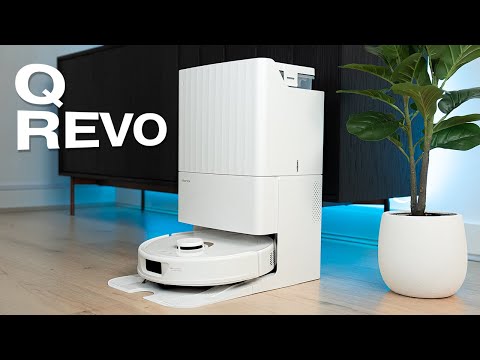
2.1 Dual Spinning Mop System (200 RPM) and 7mm Auto Mop Lifting for Carpet Protection
Let’s start with the feature that makes the Q Revo feel different the moment you flip it over: dual spinning mop pads.
Instead of the older single vibrating pad used on previous S7/S8 models, the Q Revo uses two rotating mop heads that spin at up to 200 RPM in Max+ mode. That faster, scrubbing-style motion is designed to agitate dried stains more aggressively than a simple vibration pattern. In testing, this system proved highly effective on dried-on coffee and grape juice stains, especially when paired with tighter zigzag “deep clean” patterns.
The real game-changer for mixed flooring homes? The 7mm automatic mop lifting system. When the Q Revo detects carpet in Carpet Mode, it raises the mop pads by 7mm—higher than the 5mm lift found on earlier S7 and S8 models. That difference matters. It means you don’t have to manually remove mop pads before vacuuming rugs.
Add in customizable water flow settings and multiple movement patterns—from quick clean to deep-plus zigzags—and you get flexibility that feels far more premium than “mid-range” suggests.
2.2 5500Pa Suction Power, Five Cleaning Modes, and Carpet Boost
A robot vacuum can mop beautifully—but if it can’t pick up debris, it fails the basics.
The Roborock Q Revo delivers 5,500Pa of maximum suction power in Max+ mode, placing it firmly in the upper tier of mid-range robot vacuums. It offers five suction levels:
- Quiet (around 39.3 dB)
- Balanced
- Turbo
- Max
- Max+ (full 5,500Pa with 200 RPM mop rotation)
In daily life, this means you can run Quiet mode early in the morning without waking the house—or crank it to Max+ when sand, pet hair, or cereal explosions demand attention.
There’s also automatic Carpet Boost. When the robot senses carpet, it increases suction without you needing to adjust anything. In real-world performance testing, the Q Revo achieved a 96%+ overall debris removal rate, with especially strong results on carpets after a second pass.
Is it the absolute most powerful robot Roborock makes? No. But in practical cleaning? It doesn’t just look strong on paper. It performs.
2.3 LiDAR Mapping, ReactiveAI Obstacle Avoidance, and Multi-Level Support
Navigation is where cheap robots fall apart. Random bumping. Missed rooms. Dead batteries halfway through.
The Q Revo uses top-mounted LiDAR (Light Detection and Ranging)—think of it as a tiny spinning laser scanner that maps your home in 360 degrees. During quick mapping, it can create a floor plan in about five minutes, placing it among the more efficient mapping robots tested.
Pathing is systematic, not chaotic. It outlines edges first, then fills rooms in structured S-shaped passes. The result? Efficient coverage and fewer missed patches.
For obstacle avoidance, it uses ReactiveAI with a front-mounted structured light sensor. However, here’s the honest downside: in controlled obstacle testing, it scored 4 out of 12 in obstacle avoidance performance. That’s notably weaker than S8 Pro Ultra models that include additional side lasers.
2.4 All-in-One Multifunctional Dock: Auto Dust Emptying, Mop Washing, Hot Air Drying, and 5L Water Tanks
This is where the Q Revo punches far above its price tier.
The multifunction dock doesn’t just charge the robot. It:
- Automatically empties the dustbin into a 2.7L disposable bag
- Washes mop pads after cleaning
- Dries them with hot air (around 2 hours)
- Refills the onboard water tank
- Separates clean (5L) and dirty (4.2L) water tanks
With a single 5L refill, it can cover up to 4,305 square feet in mopping mode. That’s substantial for large homes.
3. Real-World Performance: Carpet Cleaning, Pet Hair Pickup, and Stain Removal Tests

3.1 Carpet and Hard Floor Debris Pickup: 96%+ Overall Cleaning Scores
Numbers don’t tell the whole story—but they do tell something.
In comprehensive testing, the Q Revo achieved a 96.2% overall debris removal rate, with no surface type scoring below 91%. On carpet, it reached a 98% pickup rate after a second pass.
Here’s what that means in practical terms: after the first run, some debris may remain embedded in medium-pile carpet. But on the second structured pass, the robot circles back and significantly improves results.
Edge cleaning is assisted by a soft-bristled side brush, which performed well along baseboards. On high-pile carpet, it covered nearly 1,500 square feet on a single charge under maximum power conditions.
3.2 Pet Hair and Long Hair Handling: What to Expect (and Brush Maintenance)
If you’re a pet owner, this section matters.
In controlled testing, the Q Revo removed 90% of embedded pet hair from high-pile carpet after two cycles. On hardwood floors, it achieved 100% long-hair pickup across two runs.
However—there’s nuance. The main rubber brush can accumulate hair tangles at the ends, especially with longer strands. Post-cleaning maintenance sometimes involves manually removing wrapped hair from the brushroll.
3.3 Mopping Performance on Dried Stains vs. Wet Spills
Robot mops shine with dried stains. Wet messes? That’s trickier.
With dried coffee and grape juice tests, the Q Revo performed nearly perfectly. The 200 RPM spinning pads and controlled water dispensing made a visible difference, especially in deep clean zigzag mode.
3.4 Navigation Efficiency and Battery Coverage in Multi-Room Homes
Efficiency equals freedom.
The Q Revo mapped test environments in roughly five minutes using quick mapping. During performance runs, it averaged about 1.6 minutes per battery percentage point, translating to approximately 1,500 square feet per charge under average conditions.
If the battery drops below 15%, it automatically returns to dock, recharges, and resumes cleaning. For multi-room homes, this matters. You don’t have to babysit it.
4. Roborock Q Revo vs S8 Series and Q7: Is It Truly a Flagship Alternative?
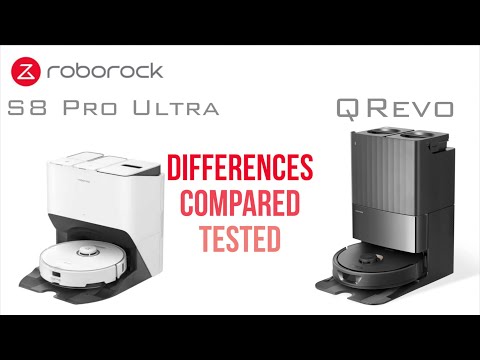
4.1 Q Revo vs S8 Pro Ultra: Suction, Brush Design, and Obstacle Avoidance Trade-Offs
Let’s compare directly.
| Feature | Q Revo | S8 Pro Ultra |
|---|---|---|
| Suction | 5,500Pa | 6,000Pa (≈9.1% higher) |
| Brush | Single rubber brush | Dual roller brush |
| Mop Lift | 7mm | 5mm |
| Obstacle Avoidance | Structured light | Structured light + side lasers |
The S8 Pro Ultra has about 9.1% higher suction power and a dual roller brush system, which generally performs better with deep carpet agitation and pet hair. It also includes additional side lasers for improved obstacle avoidance.
But here’s the twist: the Q Revo’s 7mm mop lift is actually higher than the S8’s 5mm lift. And its dock includes similar automation—washing, drying, refilling—at a significantly lower price point.
Check Price Difference on Amazon4.2 Q Revo vs Q7: Why the Dock and Obstacle Avoidance Matter
Now compare it to the Q7. The Q7 lacks obstacle avoidance entirely and does not include the advanced multifunction dock. Upgrading to the Q Revo gets you:
- Dual spinning mops
- Mop lifting
- Structured light obstacle avoidance
- Self-emptying + self-washing dock
- Larger water tanks
For households focused on hands-free automation, the Q Revo is a substantial step up. It shifts from “robot vacuum” to “automated floor care system.”
4.3 Who Should Buy the Roborock Q Revo—and Who Should Skip It?
Pros
- Near-flagship automation without S8 pricing
- Mop washing and drying convenience
- Mixed hard floors and rugs handling (7mm lift)
- Efficient LiDAR mapping
Cons
- Struggles with heavy floor clutter (cables/socks)
- Single brushroll versus flagship dual-rollers
- Obstacle avoidance is not best-in-class
The Roborock Q Revo isn’t perfect. But for many households, it hits that rare balance of price, performance, and automation. Not overkill. Not underpowered. Just right.
5. Setup, App Experience, and Smart Home Integration

You can have the best cleaning hardware in the world—but if setup is a nightmare or the app feels clunky, the whole experience falls apart. Thankfully, the Roborock Q Revo is surprisingly straightforward to get up and running. Let’s walk through what it’s actually like from box to first clean—and how well it integrates into a modern smart home.
5.1 Unboxing, Dock Placement, and First Mapping Run
Unboxing the Q Revo feels more like setting up an appliance than assembling a gadget. Inside, you’ll find the robot, the multifunction dock, dock base, disposable dust bag (one typically pre-installed), rotating mop modules, and power cable.
Setup is mostly plug-and-play:
- Snap the dock base into place.
- Plug in the dock and route the cable neatly along the back.
- Install the two spinning mop pads (they attach magnetically with a hex-style mount).
- Fill the clean water tank on the right side of the dock and slide it back in.
- Place the robot onto the charging contacts.
That’s it. No complicated assembly.
To begin, download the Roborock app, scan the QR code on the robot, and follow the prompts. On the very first run, the Q Revo performs a quick mapping pass using its LiDAR system. It typically maps a floor plan in about five minutes, creating a structured layout before it even begins full cleaning.
The first time you see it outline the room edges and then move in precise S-shaped paths, you realize—this isn’t random bump-and-go. It’s systematic. Efficient. Calm.
And once that map is created, the real customization begins.
5.2 Wi-Fi Connection (2.4GHz), Map Editing, and No-Go Zones
Let’s talk connectivity—because this is where many smart devices frustrate people.
If the robot doesn’t connect immediately, resetting Wi-Fi is simple: press and hold the power and dock buttons together until prompted in the app. Enter your password, and within minutes the robot is online.
From there, the Roborock app becomes your control center.
You can:
- Create no-go zones and invisible walls
- Customize suction and water flow per room
- Set cleaning schedules by room and day
- Enable Carpet Boost
- Adjust how often it returns to wash mop pads
- Toggle firmware auto-updates
The map editor is intuitive. You can rename rooms, merge or divide areas, and even assign different suction or mop intensity levels room by room.
This isn’t a barebones companion app. It’s one of the most feature-rich robot vacuum apps currently available.
5.3 Alexa, Google Assistant, and Siri Voice Control
Now imagine this scenario:
You spill cereal in the kitchen. Your hands are full. Instead of reaching for your phone, you just say, “Alexa, start cleaning the kitchen.”
The Q Revo supports Alexa, Google Assistant, and Siri Shortcuts integration.
For Alexa:
- Add the robot in the Roborock app first.
- Open the Alexa app → Skills & Games.
- Search for “Roborock Home” or compatible skill.
- Link your account and discover devices.
Once connected, you can start cleaning, stop cleaning, or send it back to dock via voice command.
For Google Assistant:
- Link your Roborock account in the Google Home app.
- Assign the device to a room.
- Use commands like “Hey Google, start the vacuum.”
For Siri Shortcuts:
Inside the Roborock app, you can create custom voice commands—like “Clean my basement” or “Return to dock”—and trigger them through Siri.
Is voice control necessary? No. Is it incredibly convenient once you get used to it? Absolutely.
6. Reliability, Maintenance, and Long-Term Ownership Costs
Buying a robot vacuum isn’t just about the first month. It’s about month six. Month twelve. What happens when parts wear out? When firmware updates roll out? When the dock starts demanding attention?
6.1 Common Issues: Dock Maintenance, Suction Complaints, and Firmware Improvements
No robot vacuum category is perfectly mature yet—and the Q Revo is no exception.
Some users have reported cleaning performance issues emerging after 3–4 months of use, particularly involving suction or dirt being left behind. In official troubleshooting guidance, Roborock suggests checking for clogs in the brushroll, suction pathway, and air ducts.
There have also been reports of dock-related problems such as leaking during mop washing in isolated cases. While not universally experienced, these complaints highlight that regular inspection matters.
On the positive side, firmware updates have improved behavior over time. For example, firmware version 2.13.30 demonstrated measurable improvements to obstacle avoidance performance, addressing earlier concerns about the robot pushing into objects too aggressively.
The Q Revo performs best when maintained regularly. Neglect the dock and filters, and performance can decline. Stay proactive, and it remains consistent.
6.2 Replacement Parts Schedule: Brushes, Filters, Mop Pads, and Dust Bags
| Component | Recommended Replacement Interval |
|---|---|
| Main Brush | 300 hours of use or every 6–12 months |
| Side Brush | Every 3–6 months (around 200 hours) |
| Filter | Every 6–12 months; rinse biweekly and allow 24 hours to dry |
| Mop Pads | Every 1–3 months depending on usage |
| Dust Bag | Typically replaced about every 7 weeks on average |
The app tracks component life and alerts you when replacements are due, which removes the guesswork. For heavy pet households running daily cleans, expect to be on the shorter end of these intervals.
6.3 Water, Electricity, and Realistic Ongoing Costs
The Q Revo operates at about 80W during normal cleaning. Over the course of a year, typical daily usage equates to roughly 18.25 kWh annually—which is relatively modest compared to many household appliances.
| Resource/Tank | Capacity / Performance |
|---|---|
| Clean Water Tank | 5L (Covers approx. 3,552 sq.ft.) |
| Dirty Water Tank | 4.2L |
| Debris Collection Bag | 2.7L |
For most moderate-use homes:
- Clean tank refill: about once weekly
- Dirty tank emptying: every 1–3 weeks
- Dust bag replacement: roughly every 7 weeks
7. Conclusion: Is the Roborock Q Revo Worth It?
The Roborock Q Revo sits in a very specific—and very compelling—position.
Pros
- Dual spinning mops with 7mm automatic lifting
- All-in-one dock: self-emptying, washing, and hot air drying
- Robust LiDAR navigation and feature-rich app
- Excellent dried stain removal and debris pickup
Cons
- Obstacle avoidance is weaker than S8-series models
- Dock requires periodic manual deep cleaning
- Consumables add to long-term ownership costs
If you want hands-free floor cleaning without paying S8 Pro Ultra pricing—and your home isn’t a minefield of cables—the Q Revo is one of the strongest mid-range automation packages available.
👉 Check Latest Price on AmazonFor many households, it hits the sweet spot. Not the absolute best in every category. But arguably the best balance of performance, automation, and value.
8. FAQ About the Roborock Q Revo
Q: Does the Roborock Q Revo work on thick carpet?
A: Yes, it performs well on carpet, achieving up to 98% debris pickup after a second pass in testing. However, it uses a single rubber brush (not dual rollers like the S8 series), so very thick or heavily embedded debris may benefit from higher-end models.
Q: Does it require 2.4GHz Wi-Fi?
A: Yes. The Q Revo supports 2.4GHz Wi-Fi only. 5GHz networks are not supported, so you may need to adjust router settings during setup.
Q: How often do you replace the dust bag?
A: On average, about every 7 weeks depending on home size and debris levels.
Q: Can it handle pet hair daily?
A: Yes. It removed 90% of embedded pet hair in testing and 100% of long hair on hard floors across two runs. Expect occasional brush maintenance for tangles.
Q: What happens when the battery runs low?
A: When battery drops below 15%, the robot automatically returns to the dock, recharges, and resumes cleaning where it left off.
Q: How loud is it?
A: Noise ranges from about 39.3 dB in Quiet mode up to around 65 dB in higher power modes, making it relatively quiet compared to many robot vacuums.