

Shark AI Ultra Review: Real-World Cleaning Tests, Bagless Self-Empty Performance, and Is It Worth It?
Aaron Cooper
Review: Shark AI Ultra
Quick Take: A high-value LiDAR robot vacuum featuring a cost-saving bagless self-empty base and industry-leading performance on hard floors.
Best For: Homes with mostly hardwood, tile, or laminate flooring and users who want to avoid recurring costs for vacuum bags.
Keep in Mind: While it excels at surface debris, it struggles with deep-cleaning pet hair from thick carpets and lacks advanced small-object avoidance.
1. Introduction
If you’re searching for the Shark AI Ultra, you’re probably not looking for marketing fluff—you want to know one thing: does it actually clean well in a real home?
The Shark AI Ultra is a mid-range LiDAR robot vacuum with a bagless self-empty base, positioned as one of the more affordable options that combines laser mapping and hands-off debris disposal. In this review, we’ll break down real-world cleaning performance on hardwood and carpet, pet hair handling, edge cleaning, navigation accuracy, maintenance costs, and overall value—strictly based on documented test data and verified results.
2. Cleaning Performance: Hardwood, Carpet, Edge Tests & Hair Pickup
2.1 Hardwood & Mixed Debris Results (Up to 99.8% Removal)
Hardwood floors are where most robot vacuums either quietly impress—or quietly disappoint.
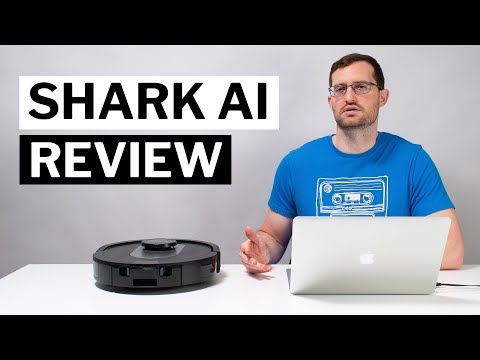
In controlled debris tests using sugar, kitty litter, rice, and cereal across multiple floor types, the Shark AI Ultra delivered a 97.8% overall debris removal rate. That’s already strong. But on hardwood specifically, it achieved an exceptional 99.8% debris removal on hardwood floors.
In practical terms? That means when it rolls across your kitchen or entryway, it’s not just pushing cereal flakes around. It’s actually clearing them. Even heavier debris like kitty litter was nearly completely removed in a single cleaning session.
Compared to broader robot averages—94.6% on low-pile carpet and 95.9% on high-pile—the Shark AI Ultra’s hard-floor performance is clearly above industry norms.
For hard-floor homes, this is one of its strongest selling points.
2.2 Low-Pile vs High-Pile Carpet: Where It Performs Well—and Where It Struggles
Carpet is where things get more nuanced.
On low-pile carpet, the Shark AI Ultra achieved around 95%+ debris removal—slightly above the 94.6% average seen across tested robots. On high-pile carpet, it reached approximately 96%, again edging out the 95.9% industry average.
That’s solid surface-level cleaning. It handles cereal, rice, and medium debris well. But what about fine, embedded particles?
In a deeper stress test with 30 grams of fine debris worked into carpet fibers, the Shark AI Ultra picked up 7 grams after three passes—and that result remained the same even when switching from default to max power.
For everyday upkeep between weekly upright sessions? It’s capable. For heavy, embedded grit in plush carpeting? Expectations should stay realistic.
2.3 Edge & Corner Cleaning: Side Brush Design Limitations
Let’s talk about edges—the quiet frustration zone of many robot vacuums.
Despite having side brushes, multiple test analyses showed that the Shark AI Ultra consistently left debris along baseboards and tight corners. Even after repeated passes, small debris remained hugging the edges.
Why?
The side brush design uses a single bundle of bristles extending from the center, rather than multiple evenly spaced bundles. In practice, this limits how often the brush actually makes contact with edge debris. Other robots with multi-strand side brushes sweep edges more frequently during rotation.
The result: it often relies heavily on its main brushroll cleaning path rather than effectively pulling debris inward from the perimeter.
If you’re someone who notices that thin dusty line along your baseboards, this could bother you. It’s not catastrophic—but it’s noticeable.
2.4 Long Hair & Pet Hair: Tangle Risk and Carpet Fur Performance
Now for pet owners—the make-or-break category.
In long-hair tests (0.3g placed in its path), the Shark AI Ultra successfully removed all visible hair from the floor surface. However, most of that hair wrapped around the brushroll, particularly near the ends. Estimates from testing showed roughly 80–90% of collected hair tangled rather than being fully transferred into the dustbin.
Is it manageable? Yes. But it means regular brushroll checks—especially in long-hair households.
Pet hair performance on carpet was more concerning. In embedded pet hair testing, more than half of the hair remained after two cleaning passes. Additional stress testing described it as a below-average performer for pet hair pickup, pushing some tufts toward edges instead of fully extracting them.
- Excellent hardwood debris removal (99.8%)
- Structured grid cleaning pattern
- Reliable daily maintenance for light shedding
- High hair-tangle rate on brushroll (80-90%)
- Sub-par edge and corner cleaning
- Struggles with deep-embedded carpet fur
3. Bagless Self-Empty Base: How It Works & Real Maintenance Costs
3.1 How the 60-Day Bagless Auto-Empty System Operates
Daily dustbin emptying is where robot vacuums start to feel… less automatic.
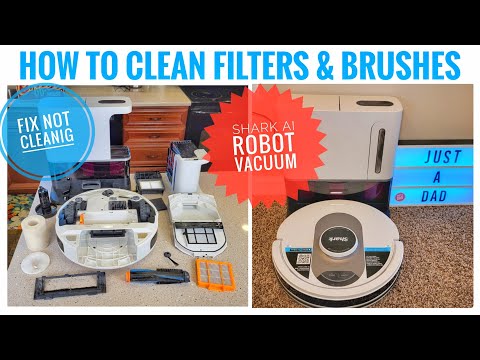
The Shark AI Ultra solves that with a 60-day bagless self-empty base. When the robot docks after cleaning, a vacuum motor inside the base activates and pulls debris from the onboard dustbin into a larger chamber.
- No disposable bags required
- No weekly bag replacements
- Removable plastic chamber for easy disposal
Compared to non-self-empty robots—where you’re dumping the bin every run—this is a noticeable quality-of-life upgrade. You could realistically go weeks without touching it, depending on usage.
3.2 Filter Cleaning, HEPA Components & Ongoing Maintenance Schedule
Here’s where marketing and reality meet. Yes, it’s bagless. But maintenance doesn’t disappear.
| Component | Maintenance Action | Frequency |
|---|---|---|
| Foam Filters | Wash & Air Dry | Every 2 Months |
| HEPA Filter | Replacement | Every 6–12 Months |
| Brushroll | De-tangling | Weekly (Pet homes) |
Owners have noted that while the foam filter is reusable, it can get quite dusty—meaning emptying and cleaning isn’t as “sealed” as bagged systems. It’s not difficult. Just slightly messier.
3.3 Bagless vs Bagged Self-Empty Robots: Where Savings Actually Come From
Bagged systems require replacement dust bags over time. The Shark AI Ultra eliminates that recurring expense entirely thanks to its bagless design.
Long-term savings depend on:
- Cleaning frequency
- Home size
- Pet shedding levels
- Filter replacement intervals
If recurring consumables annoy you, the bagless system is a compelling advantage. If you prefer completely sealed, low-dust disposal? Bagged systems may feel cleaner. It’s a trade-off—convenience versus containment.
4. LiDAR Navigation, Mapping Accuracy & Obstacle Avoidance

4.1 Mapping Speed & Room Customization in the SharkClean App
The Shark AI Ultra uses LiDAR navigation—think of it like a tiny spinning laser scanner on top of the robot that measures distances in all directions to build a floor plan in real time.
During its initial “Explore Run,” mapping typically takes about 15–20 minutes for a large floor plan. After that, you can label rooms, divide areas, create no-go zones, and set targeted cleaning tasks within the SharkClean app.
- Label rooms for custom cleaning schedules.
- Create no-go zones to avoid problematic areas like rug tassels or pet bowls.
- Select individual room cleaning for high-traffic zones.
- Activate Matrix Clean for targeted, multi-pass cleaning.
4.2 Real-World Navigation: Coverage, Efficiency & Recharge-and-Resume
In open-room testing, the Shark AI Ultra followed a neat row-by-row cleaning pattern and achieved full coverage.
In a ~1,000 sq ft test area, it completed cleaning in about 70–80 minutes, compared to an average of 50–60 minutes across other tested robots. It also supports recharge-and-resume, meaning if the battery runs low, it docks, charges, and continues where it left off.
4.3 Obstacle Avoidance Limits: Cables, Low Objects & Pet Accidents
That means:
- Cables on the floor? Use no-go zones.
- Small toys? Pick them up first.
- Pet accidents? It will not reliably avoid them.
At this point, the Shark AI Ultra presents a clear personality:
✅ Excellent hardwood cleaning
✅ Strong value for a bagless self-empty LiDAR robot
⚠️ Weak edge cleaning
⚠️ Struggles with embedded pet hair
⚠️ Limited low-profile obstacle avoidance
5. Setup Process, App Experience & Daily Usability
5.1 Initial Setup, Wi‑Fi Pairing & Dock Placement Requirements
The first impression of any robot vacuum isn’t how it cleans—it’s how frustrating (or painless) it is to set up.
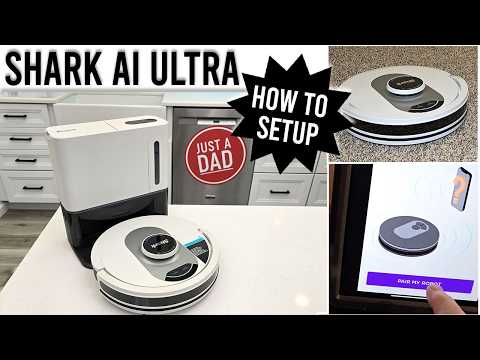
With the Shark AI Ultra, setup is fairly straightforward, but you do need to follow placement rules carefully. The base must sit on a hard floor (not carpet), flush against a wall, with 3 feet of clearance on each side and 5 feet in front. That open space allows the robot to dock properly and activate the self-empty cycle without confusion.
Pairing requires pressing and holding the Clean + Dock buttons simultaneously, which triggers Wi‑Fi pairing mode. The robot briefly transmits its own Wi‑Fi signal, which your phone must connect to before handing it over to your home network. It’s not difficult—but you do need to follow the steps exactly.
After pairing, you’ll run an “Explore Run” to generate your home map. Open doors. Pick up clutter. Let it scan. Within a short mapping session, you’ll have a digital layout ready for room labeling and zoning.
Overall: beginner-friendly, but detail-dependent.
5.2 Scheduling Limits, Power Modes & App Frustrations
Once mapped, everything revolves around the SharkClean app.
- Clean the whole house
- Select individual rooms
- Create no-go zones
- View cleaning reports
- Enable Do Not Disturb
- Activate Matrix Clean for deeper passes
On paper, it checks all the boxes. In daily use, it’s mostly smooth—but not perfect.
Another minor frustration: the robot defaults back to Normal power mode at startup, even if you previously selected Max. That means adjusting power requires opening the app after cleaning begins.
Some reviewers also mentioned occasional app windows not loading properly or minor interface hiccups. Nothing catastrophic—but enough to remind you the software feels functional rather than premium.
It works. It cleans. It schedules reliably. But it doesn’t feel cutting-edge.
5.3 Noise Levels & Everyday Living Impact
Robot vacuums are about reclaiming time—not adding noise stress to your home.
Measured noise levels for the Shark AI Ultra were:
| Mode | Noise Level |
|---|---|
| Baseline Room | 42.2 dB |
| Low | 64.4 dB |
| Medium | 66.2 dB |
| High | 67.3 dB |
| Self-Empty | 79.8 dB |
During cleaning, 64–67 dB is roughly equivalent to a normal conversation or a dishwasher running. You’ll hear it—but you can still work nearby.
The self-empty cycle, however, spikes to 79.8 dB during auto-empty. That’s closer to alarm-clock territory. It only lasts a short burst, but it’s noticeable.
This is where scheduling matters. Running it while you’re out of the house—or enabling Do Not Disturb overnight—makes a big difference in perceived disruption.
In everyday living? It’s average for its class. Not whisper-quiet. Not obnoxious. Just audible automation doing its thing.
6. Price-to-Performance: Is Shark AI Ultra Worth It vs Other LiDAR Robots?
6.1 Current Pricing & Core Specs (0.8 kPa Suction, 120‑Min Runtime)
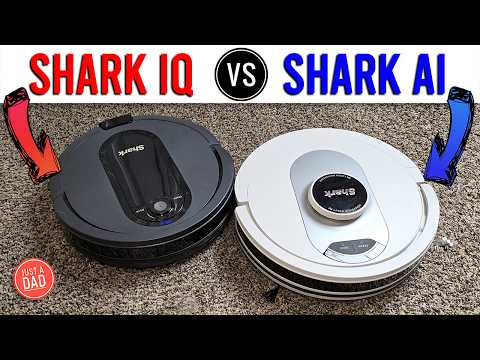
The Shark AI Ultra sits squarely in the mid-range category—but with premium-style features.
Verified specs include:
- 0.8 kPa suction power
- 19 CFM airflow
- Up to 120-minute runtime
- 14.9" diameter
- 5.7" height
- Bagless 60-day self-empty base
Pricing typically falls between $349–$377, depending on sales. That positioning makes it one of the more affordable LiDAR-based self-empty robots available.
Here’s how that breaks down:
| Feature | Shark AI Ultra |
|---|---|
| Navigation | LiDAR (laser mapping) |
| Self-Empty | Yes (Bagless) |
| Suction | 0.8 kPa |
| Airflow | 19 CFM |
| Runtime | Up to 120 min |
| Typical Price | $349–$377 |
At this price tier, you’re getting laser navigation plus automatic debris disposal—two features that used to require a much higher budget.
It’s not flagship-level. But it’s feature-dense for the money.
6.2 Where It Wins: Bagless Self-Empty + Strong Hardwood Cleaning
If your home is mostly hardwood, laminate, or tile, this is where the Shark AI Ultra feels purpose-built.
It achieved 99.8% debris removal on hardwood floors, which places it firmly above average for hard-floor pickup. Combine that with structured LiDAR navigation and a bagless auto-empty system, and you get a robot that handles daily surface maintenance extremely well.
The bagless dock is a major differentiator. Most self-empty stations require purchasing replacement bags. Here, you empty a chamber directly into the trash. Over time, that removes recurring consumable costs.
6.3 Where Competitors May Do Better: Edge Cleaning & Pet Hair
No robot at this price point is perfect—and the Shark AI Ultra has clear trade-offs.
- Exceptional hardwood debris removal (99.8%)
- No recurring cost for bags
- Reliable LiDAR room mapping
- Leaves debris along baseboards (single side brush)
- Below-average performer for pet hair on carpet
- Lacks advanced front-facing obstacle avoidance
So who should think twice?
- Heavy-shedding dog owners with thick carpet
- Perfectionists about edge detailing
- Homes with lots of cables or floor clutter
But for structured homes with mostly hard floors and moderate shedding? The trade-offs may feel acceptable—especially at this price tier.
7. Conclusion: Who Should (and Shouldn’t) Buy the Shark AI Ultra?
The Shark AI Ultra is not a luxury flagship robot. It’s something more practical: a strong hard-floor cleaner with a genuinely convenient bagless self-empty base at a competitive mid-range price.
It excels in hardwood performance, delivers structured LiDAR mapping, and removes the recurring cost of dust bags. For homes with mostly hard flooring and moderate pet hair, it can handle daily maintenance reliably.
Where it falls short is equally clear: edge cleaning isn’t precise, embedded pet hair extraction is average at best, and obstacle avoidance requires some floor prep.
If you want automation without overspending—and your expectations align with maintenance cleaning rather than deep carpet restoration—the Shark AI Ultra is a smart buy.
8. FAQ: Shark AI Ultra Common Questions
Q: 8.1 Does Shark AI Ultra Replace a Full Upright Vacuum?
A: No—and it’s important to set expectations correctly. The Shark AI Ultra is designed for maintenance cleaning, not deep extraction. It keeps daily debris, dust, crumbs, and surface-level dirt under control. On hardwood floors especially, it performs extremely well. However, in deep carpet testing, pickup was limited compared to a full upright. Think of it as reducing how often you need to vacuum manually.
Q: 8.2 How Often Do You Need to Clean the Filters?
A: The washable foam filters should be cleaned roughly every one to two months, depending on usage and pet hair levels. They must be fully dried before reinstalling. The HEPA filter typically requires replacement every 6–12 months. If you have shedding pets, expect to check the brushroll frequently as well.
Q: 8.3 Can It Avoid Cables or Pet Accidents?
A: It reliably avoids taller objects but struggles with low-profile items. Testing showed it failed to avoid several objects, particularly small or low items. It does not use a front-facing camera for advanced object recognition. For cables, pet bowls, or cluttered areas, setting up no-go zones in the app is strongly recommended.
Q: 8.4 Is the Bagless Base Messy to Empty?
A: Emptying the main debris chamber is simple—press a button and dump it into the trash. However, because it’s bagless, dust exposure can occur during filter cleaning. Foam filters can get visibly dirty and require rinsing. If you prefer no ongoing consumable costs, the trade-off makes sense. If you prefer maximum containment, bagged systems may feel cleaner.