
Dolphin Nautilus CC Plus Not Climbing Walls? 5 Common Causes & Fast Fixes (Step-by-Step Guide)
Aaron Cooper1. Introduction: Why Your Dolphin Nautilus CC Plus Stops Climbing Walls
You bought a robotic pool cleaner to stop scrubbing walls by hand—so when your Dolphin Nautilus CC Plus hugs the floor but refuses to climb, it’s instantly frustrating. That waterline grime? Still staring at you. The corners? Still collecting buildup.
Here’s the good news: in most cases, this isn’t a serious failure. It’s usually one of a handful of very fixable issues—things like clogged filters, worn brushes, incorrect settings, or even slightly off water conditions.
The trick is diagnosing by symptoms. Is it slipping down the wall? Not attempting to climb at all? Or starting strong and then giving up halfway?
2. Cause #1–#2: Loss of Suction or Traction (Filters & Brushes)

2.1 Clogged Filters: The #1 Reason Your Robot Won’t Climb
If your robot suddenly feels “lazy” on walls, this is the first place to look.
Because here’s the reality: clogged filters are the most common reason these cleaners lose wall-climbing ability.
Even when they look clean.
Fine debris—dust, pollen, algae—can dry inside the filter նյութ and silently choke airflow. The result? Weak suction. And without strong suction, the robot simply can’t hold itself vertically.
What that feels like in real life:
- It starts climbing… then slides back down.
- It never even attempts the wall.
- It moves slower than usual.
How to fix it (properly):
- Remove the filter cartridges or bag
- For cartridges: soak in a filter cleaning solution
- For filter bags: machine wash with mild detergent + a little bleach (air dry only)
- Rinse thoroughly—no residue left behind
- Let everything fully dry before reinstalling
- Snap filters back in tightly—no gaps, no looseness
Small habit, big payoff: clean filters after every cycle. Skip this, and the problem comes right back.
2.2 Worn or Dirty Brushes: When Grip Starts Slipping
Think of the brushes as your robot’s tires.
When they’re in good shape, they grip the wall and drive upward with confidence. But once they’re worn down, coated in oils, or slightly damaged? It’s like trying to climb a hill on bald tires.
The symptoms are subtle at first:
- The robot tries to climb—but slips
- It reaches halfway, then loses grip
- Movement feels inconsistent or hesitant
Over time, this only gets worse.
What to check:
- Remove the brush assembly
- Look for visible wear, tearing, or flattening
- Check for buildup (algae film, oils, debris)
- Spin them manually—do they rotate freely?
Fix it fast:
- If dirty: scrub gently with a soft brush and rinse thoroughly
- If worn or damaged: replace them (this is a normal wear part)
- Reinstall and make sure rotation is smooth and unrestricted
2.3 Climbing Rings (Foam Rings): Small Parts, Big Impact
These are easy to overlook—but they quietly make a huge difference.
Climbing rings (those foam bands on the rollers) are what give your robot that extra traction boost, especially on smoother surfaces like tile or fiberglass. Without them working properly, even strong suction won’t save you.
Here’s the catch: they don’t fail dramatically—they degrade slowly.
Over time, they:
- Harden when dry
- Lose flexibility
- Sit lower than the brush line
- Stop making proper contact with the wall
According to maintenance guidance, these rings need to be soft and pliable to work correctly—you should be able to squeeze them and feel some give.
How to fix or test:
- Let the robot sit in water for 5–10 minutes before running (this helps rings soften)
- Squeeze the foam—if it feels hard, that’s a red flag
- Check alignment—if they sit below the brush line, they’re no longer effective
If they’ve hardened significantly, replacement is the real solution. Fresh rings feel slightly damp, flexible, and “grippy”—and the difference in climbing performance is immediate. Tiny part. Massive impact.
3. Cause #3–#5: Settings, Water Conditions, and Missing Components
3.1 Wrong Cleaning Mode: Quick-Clean vs Standard Mode
This one catches people off guard all the time—because nothing is “broken.” Your robot is just doing exactly what you told it to do.
If your Dolphin is set to Quick-Clean mode, it’s designed to clean the floor only. No wall climbing. No waterline scrubbing. Just the bottom.
So if your cleaner:
- Moves normally
- Cleans the floor well
- But completely ignores walls
How to check:
- Look at the power supply unit (PSU)
- If you see a semi-circle icon, that typically indicates Quick-Clean mode
- Switch to Standard or Enhanced mode
If you’re using an app or remote, double-check that settings aren’t restricting wall coverage. This is the easiest fix on this list. Just one setting. Problem solved.
3.2 Water Conditions & Slippery Pool Surfaces
Sometimes the issue isn’t the robot at all—it’s your pool. Even a perfectly functioning cleaner will struggle if the walls are too slippery to grip.
Common culprits:
- Algae (even early-stage, invisible buildup)
- Sunscreen and body oils
- Chemical imbalance (especially high pH)
- Temperature outside the recommended range
In fact, water outside the typical 43–93°F range can reduce movement and climbing performance, making the robot feel sluggish or ineffective.
Fix it like a pro:
- Brush pool walls manually to remove buildup
- Test and rebalance pH and chemicals
- Ensure water temperature is within range
- Run the cleaner again after surfaces are clean
3.3 Missing Rapid Drain Flap or Poor Filter Installation
Now we get into the small-but-critical components.
There’s a part called the rapid drain flap—a simple rubber piece located behind the rear roller brush. It doesn’t look like much, but it plays a huge role in maintaining suction. Without it, the robot can’t create the seal it needs to climb.
Critical Checkpoints
- Rapid drain flap present and seated
- Cartridges snapped firmly
- Filter bags tight with no gaps
Symptoms of Failure
- Weak or inconsistent climbing
- Struggles to stay vertical
- Performance drops suddenly
How to check:
- Flip the robot upside down
- Look behind the rear roller brush
- Find the black rubber flap
- Make sure it’s present and properly seated
If it’s missing, it needs replacement—no workaround here. Even a small gap breaks suction. This is one of those fixes that takes 30 seconds—but can completely restore performance.
4. When It’s More Than a Simple Fix: Mechanical or Internal Issues
So you’ve cleaned the filters, checked the brushes, fixed the settings… and it still won’t climb. Or worse—it starts strong, climbs halfway up the wall, then suddenly stops and drops like a rock.
That’s when things get a bit more serious.
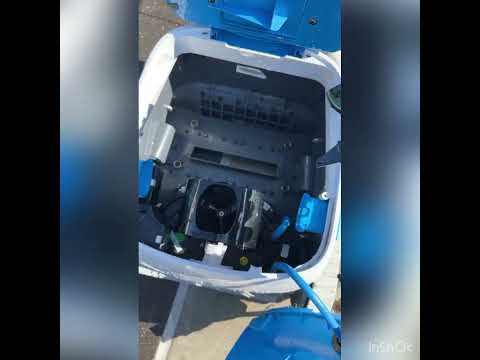
Across real-world cases and teardown insights, one pattern shows up again and again: when a Dolphin runs briefly and then shuts down mid-cycle, it’s often tied to internal resistance—something physically or electrically preventing smooth operation.
In many cases, intermittent stopping is linked to motor assembly or internal drive issues, especially as units age.
Here’s what that can look like in practice:
- Runs perfectly for a few minutes, then stops at the wall
- Drops immediately when attempting a climb
- Starts again after reset… then repeats the cycle
What you can check yourself:
- Open the top housing and inspect for debris buildup
- Look for hair wrapped around the impeller shaft
- Ensure nothing is blocking internal water flow
If you find buildup, clear it carefully and reassemble.
It’s frustrating. But it’s also rare. Most units never reach this stage without years of use or skipped maintenance. Which brings us to the part that saves you hours of guesswork…
5. Quick Diagnostic Checklist: Identify the Problem in Minutes
When your pool robot stops climbing, the worst part isn’t the issue—it’s the uncertainty. You don’t know where to start, so you end up checking everything.
Let’s fix that. Use this quick symptom-based checklist to zero in on the cause fast—no guesswork, no wasted time.
5.1 If It Won’t Climb at All
This is the “completely ignores walls” scenario. Start with the highest-probability fixes first:
- Filters → Remove and clean thoroughly (or test briefly without them)
- Mode settings → Make sure you’re not stuck in Quick-Clean (floor-only) mode
- Rapid drain flap → Confirm it’s present and properly seated
- Water conditions → Check for algae, oil buildup, or imbalanced chemistry
Here’s the logic: if there’s no climb attempt at all, it’s usually suction or settings—not traction. Fix those first. 90% of the time, that’s it.
5.2 If It Starts Climbing but Slips or Falls
This one is all about grip. Your robot wants to climb—it just can’t hold on. Focus here:
- Brush condition → Worn, smooth, or dirty brushes lose traction fast
- Foam climbing rings → They should feel soft and slightly “spongy”
- Wall surface → Any invisible film (algae, sunscreen, oils) creates a slippery barrier
Clean, soften, or replace—and the difference is immediate.
5.3 If It Stops Mid-Cycle or Acts Inconsistently
This is where things shift from “maintenance” to “mechanical.” Symptoms:
- Runs for a few minutes, then shuts off
- Climbs partially, then drops and stops
- Works fine… then randomly fails
Start simple:
- Check for impeller blockage (hair, debris inside)
- Inspect for restricted airflow or suction paths
- Make sure nothing is physically jamming movement
If everything looks clean but the issue persists, you’re likely dealing with internal wear—motor, drive system, or electronics. At that point, you have two choices:
Repair Path
- Attempt a repair (if you’re comfortable opening it up)
Replacement Path
- Replace the unit for long-term reliability
6. Conclusion: Restore Climbing Performance and Keep It That Way
Here’s the reassuring truth: most wall-climbing failures aren’t “failures” at all—they’re maintenance signals.
A clogged filter. A hardened foam ring. A setting you didn’t realize was active. Small things. Big impact.
- Clean filters after every cycle
- Check brushes and climbing rings regularly
- Keep water chemistry balanced
- Do a quick visual inspection before each run
That’s it. Do this consistently, and your Dolphin Nautilus CC Plus won’t just climb walls—it’ll own them. Smooth, steady, all the way to the waterline.
Skip it? You’ll be back to watching it stall halfway up… wondering what went wrong. And now—you’ll know exactly where to look.
FAQ
Q: Why does my Dolphin Nautilus CC Plus ignore the pool walls entirely?
A: The most common reason is the cleaning mode setting. Check your power supply unit to ensure it is not set to Quick-Clean mode, which focuses solely on the floor. Additionally, check for heavily clogged filters that prevent the suction necessary to initiate a climb.
Q: How do I know if my robot's climbing rings need to be replaced?
A: Inspect the foam rings on the rollers; they should feel soft and pliable. If they feel hard, brittle, or sit lower than the brush line, they can no longer provide the traction needed for slippery surfaces like tile or fiberglass and should be replaced.
Q: Can water chemistry affect my robot's ability to climb walls?
A: Yes, high pH levels or early-stage algae growth can create an invisible, slippery film on pool walls. Even if the water looks clear, this lack of friction causes the robot to slip. Brushing the walls manually and balancing chemicals often restores climbing performance immediately.
Q: What should I check if the robot starts climbing but then falls off?
A: This usually indicates a loss of suction or grip halfway up. Thoroughly deep-clean your filter cartridges using a soak solution, as fine debris like pollen can choke airflow. Also, check the rapid drain flap at the bottom to ensure it is properly seated.
Q: Why does my pool cleaner stop moving after a few minutes of climbing?
A: Intermittent stopping is often caused by debris, such as hair or long fibers, wrapped around the internal impeller shaft. This creates resistance that triggers a safety shutdown. Inspect the top outlet and impeller area to ensure the fan can rotate freely without obstruction.