
Robot Mower Sizing Guide: How Much Cutting Capacity Do You Really Need for Your Lawn?
Aaron Cooper1. Introduction
Choosing a robot mower sounds simple—just match the rated coverage to your lawn size, right? Not even close. Those clean, confident numbers on spec sheets assume a perfectly flat yard, zero obstacles, and a mower that runs non-stop like a tireless employee. Real life? It’s trees, slopes, weird corners, charging breaks, and unpredictable grass growth.
That’s why so many buyers end up frustrated—the mower “should” work on paper, but struggles in practice. In this guide, we’ll break down what actually determines cutting capacity: terrain, layout complexity, battery cycles, and how often your mower can realistically run. Because sizing it right isn’t about specs. It’s about your yard.
2. Why Manufacturer Coverage Ratings Are Misleading (and How to Adjust Them)

2.1 The “Perfect Conditions” Assumption Behind Rated Capacity
That impressive “covers up to X square meters” claim? It’s essentially a best-case scenario—think showroom conditions, not your backyard.
Now picture your actual yard. Maybe there’s a slope that forces the mower to slow down. Maybe it spends extra time navigating around flower beds. Or maybe it pauses mid-cycle to recharge before finishing a section.
That gap between theory and reality is huge. It’s why a mower rated for a certain area might feel surprisingly underpowered once it’s dealing with real-world conditions.
And here’s the kicker: these machines don’t just mow—they search, turn, avoid obstacles, and recharge. Every one of those actions eats into actual cutting time.
2.2 Real-World Factors That Reduce Cutting Capacity by 30–50%
Here’s where things get painfully real. Once your mower leaves the “perfect lawn” fantasy, its effective capacity starts shrinking—fast.
Across multiple independent analyses, real-world efficiency typically drops by 30–45%, and in tougher conditions, even more. That’s not a small margin. That’s the difference between a perfectly maintained lawn… and one that always looks slightly behind.
What causes this?
- Complex layouts (20–30% loss): Narrow passages, multiple zones, and awkward edges force the mower to spend more time navigating than cutting.
- Slopes and uneven terrain (15–40%+): Climbing hills slows movement and increases energy use.
- Obstacles (10–20%): Trees, garden beds, and furniture create constant interruptions.
- Weather conditions (10–25%): Wet grass reduces traction and cutting efficiency.
- Battery charging cycles: Every trip back to the dock is time not spent mowing.
Put it all together, and that “3,000 m² capacity” mower might realistically behave like something much smaller. It’s not broken. It’s just dealing with reality.
2.3 The 20–30% Safety Margin Rule (When It’s Not Enough)
So how do you compensate for all this? The industry’s baseline advice is simple: always oversize.
The widely accepted rule is to choose a mower rated for at least 20% more than your lawn size, which aligns with the industry-standard recommendation to exceed your lawn area by at least 20%.
- Flat, simple lawns → 1.2× your lawn size is usually fine
- Moderate complexity or slopes → aim for 1.3–1.4×
- Complex layouts or challenging terrain → 1.5× or more
Why go bigger? Because robot mowers aren’t designed to “finish fast” like a traditional mower. They maintain your lawn gradually over time. If they’re underpowered, they fall behind—and once that happens, catching up is painfully slow.
3. How to Calculate the Right Robot Mower Capacity for Your Yard
3.1 Step 1: Measure Lawn Size and Identify Zones
Start with the obvious: how big is your lawn?
But don’t stop at total square meters. That number alone can be misleading. What really matters is how that space is structured.
Simple Layout
- Single open lawn
- Easy navigation
- Higher efficiency
Complex Layout
- Multiple separated zones
- Narrow pathways/corridors
- Requires manual intervention/complex app setup
Think of it this way: a 1,000 m² open lawn might be easier to maintain than a 700 m² yard broken into five sections.
So when measuring your lawn:
- Calculate total area
- Identify separate zones
- Note narrow passages or disconnected sections
3.2 Step 2: Factor in Layout Complexity, Obstacles, and Grass Growth
Now comes the part most people underestimate. Two lawns can be the same size—but require completely different mower capacities.
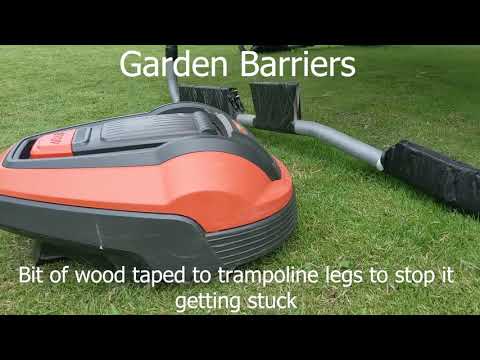
Trees, flower beds, garden edges, fences, trampolines—every obstacle forces the mower to slow down, reroute, or repeat passes. Over time, that adds up to a significant loss in efficiency.
And then there’s grass growth. Robot mowers don’t hack down tall grass—they gently trim small amounts frequently. As highlighted in real-world usage, they cut just the top layer of grass each pass, which means fast-growing lawns demand more frequent mowing cycles to keep up.
3.3 Step 3: Match Capacity to Your Daily Mowing Schedule
Here’s a mindset shift that changes everything: Robot mowers don’t rely on one long mowing session. They work in cycles—cut, recharge, repeat.
That means your available daily runtime directly affects how much area your mower can realistically handle.
| Lawn Size | Typical Daily Requirement |
|---|---|
| ~1,000 m² | A few hours daily |
| 2,000 m²+ | Extended daily operation |
| Larger Properties | Near-continuous cycles |
Also, keep in mind: operating time includes cutting, navigating, and charging. Once a mower hits its daily limit, it stops—even if the lawn isn’t fully done.
3.4 Simple Formula to Estimate Your Required Capacity
If you want a more precise way to size your mower, here’s a simplified version of the industry calculation:
Required Capacity ≈ (Lawn Area ÷ Available Weekly Runtime) × Manufacturer’s Required Runtime
Let’s make that real. Imagine:
- Lawn size: 1,250 m²
- You allow 6 hours/day, 6 days/week → 36 hours total
- The mower needs significantly more time to fully cover its rated area
When you run the math, you don’t need a 1,250 m² mower—you may need something closer to 4,000 m² rated capacity to keep up under those constraints.
4. Battery Runtime, Charging Cycles, and Daily Coverage Explained

4.1 Why Runtime per Charge Matters Less Than You Think
It’s tempting to fixate on battery runtime—“This mower runs for X hours, so it must cover more lawn.” Sounds logical. It’s also misleading.
Robot mowers don’t behave like traditional mowers that aim to finish everything in one go. Instead, they work in continuous cycles: mow, return to dock, recharge, then resume exactly where they left off. Over and over again.
This changes everything.
A mower with shorter runtime but efficient navigation and frequent cycles can outperform a “long runtime” model that wastes time overlapping or getting stuck. It’s not about one heroic run. It’s about consistency.
So if you’re imagining your mower finishing the job in one charge—reset that expectation. It doesn’t sprint. It maintains. And when it works well, you stop noticing it entirely. The lawn just always looks done.
4.2 How Charging Time Reduces Real Daily Output
Here’s the part that quietly eats into your mower’s performance: charging time.
Every time your mower heads back to the dock, it’s not cutting. And those recharge windows add up faster than most people expect.
Real-world data shows a clear pattern. A mower with multiple cycles per day doesn’t spend all its time mowing—it splits time between cutting and charging. In some cases, a significant portion of the day is spent parked and refueling.
If your schedule is tight—say, only a few hours per day—those charging interruptions become a bottleneck. The mower simply runs out of productive time before it can cover the entire lawn.
More cycles help. Longer schedules help even more. But ignoring charging time? That’s where sizing mistakes happen.
4.3 Matching Lawn Size to Recommended Daily Runtime
So how much daily runtime do you actually need?
This is where theory meets reality. Different lawn sizes demand very different schedules—and if your mower can’t meet those time requirements, it will fall behind. Slowly at first. Then visibly.
Here’s how it typically plays out:
- Smaller lawns: Can get by with just a couple of hours per day
- Mid-sized lawns: Need consistent daily operation to stay trimmed
- Larger properties: Often require extended runtimes—sometimes well beyond a standard daytime schedule
Once you move into bigger lawns, limiting runtime becomes risky. A mower that only runs a few hours daily might never fully catch up, especially during peak growth seasons.
And remember: operating time includes everything—cutting, navigating, and charging. Not just blade-on-grass time.
Every model has a maximum cutting time per day that cannot be exceeded, no matter how you tweak the schedule. Once it hits that limit, it simply stops for the day.
So if your lawn needs more time than your mower can physically deliver? No amount of scheduling will fix that. That’s when you either size up—or accept that your mower will always be playing catch-up.
5. How Navigation Technology Impacts Real Cutting Capacity
5.1 RTK vs LiDAR vs Vision: Which Covers More Ground Efficiently?
At first glance, navigation tech sounds like a “nice-to-have.” In reality, it directly affects how much lawn your mower can actually handle.
| Technology | Best For... | Key Characteristic |
|---|---|---|
| RTK (GPS) | Open, simple lawns | Hyper-precise (cm-level), efficient lines |
| LiDAR | Complex, shaded yards | 3D scanning, works under trees/near buildings |
| Vision Systems | Mixed environments | Camera-based boundary recognition, easy setup |
The takeaway? Efficiency isn’t just about speed—it’s about how little time your mower wastes figuring out where to go next.
5.2 Obstacle Avoidance, Mapping Accuracy, and Coverage Efficiency
Now let’s talk about something you can actually see: missed spots and repeated passes.
A mower with basic navigation might bounce around randomly, covering the same patch multiple times while missing others entirely. More advanced systems change that completely.
With precise mapping and smart obstacle avoidance, modern mowers follow organized paths—often in straight, methodical lines. They remember where they’ve been. They avoid unnecessary overlap. They reduce wasted movement.
The result?
- Fewer missed edges
- Less time spent re-cutting the same area
- More lawn covered per cycle
In real-world terms, a mower that wastes less time behaves like a bigger machine. On the flip side, poor navigation can make even a high-capacity mower feel underwhelming. It’s not that it lacks power—it just can’t use its time efficiently.
5.3 When to Upgrade Tech Instead of Just Buying a Bigger Mower
Here’s a mistake a lot of buyers make: They assume poor performance means they need a bigger mower.
If your mower struggles with:
- Complex layouts
- Multiple zones
- Heavy tree cover
- Frequent obstacle avoidance
Then upgrading to smarter navigation can deliver a bigger improvement than simply increasing capacity. Think of it like this: A larger mower with inefficient navigation is like a bigger car stuck in traffic. More power doesn’t help if it can’t move efficiently.
6. Conclusion: A Practical Sizing Checklist for Your Robot Mower
By now, one thing should be clear: robot mower sizing isn’t about matching numbers—it’s about matching reality.
Start with your actual lawn size, then adjust for everything that makes your yard unique: slopes, obstacles, layout complexity, and how fast your grass grows. Add a safety buffer—at least 20%, but often closer to 30–50% for real-world conditions.
- Pressure-test daily runtime against lawn size
- Account for multiple charge cycles
- Match navigation technology to yard complexity
- Include a minimum 20% capacity buffer
If there’s one rule to remember, it’s this: slightly oversizing gives you freedom. Undersizing creates constant frustration.
Because the best robot mower isn’t the one that barely works. It’s the one you never have to think about.
FAQ
Q: Why should I buy a mower with more capacity than my lawn size?
A: Manufacturer ratings assume perfect conditions. Real-world factors like slopes, complex layouts, and obstacles can reduce efficiency by 30-50%. Choosing a model with at least a 20-30% safety margin ensures the machine can maintain the lawn during peak growth seasons without falling behind.
Q: Does navigation technology affect cutting capacity?
A: Yes. Advanced navigation like RTK or LiDAR allows for systematic, straight-line mowing which reduces overlap and wasted time. A smarter mower with efficient path planning can often maintain a larger area than a random-navigation model with the same battery specifications.
Q: How much daily runtime does a robot mower need?
A: Runtime requirements vary by lawn size and complexity. While small lawns may only need 2-4 hours, larger or more complex properties often require near-continuous cycles. Remember that total runtime includes cutting, searching for the dock, and recharging throughout the day.
Q: How do slopes affect mower performance?
A: Slopes significantly increase energy consumption and reduce the mower's speed. Climbing hills drains the battery faster, leading to more frequent charging cycles and reducing the overall area the mower can cover in a single day compared to flat terrain.
Q: What is the general rule for sizing a robot mower?
A: For simple, flat lawns, aim for a mower rated at 1.2x your lawn size. For moderate complexity or slopes, use a 1.3-1.4x multiplier. For highly complex yards with many obstacles or steep hills, choose a mower with 1.5x or more rated capacity.