
Robot Mower Not Returning to Base: Common Causes and Proven Fixes (Step-by-Step Guide)
Aaron Cooper1. Introduction
You bought a robot mower to stop worrying about your lawn… not to babysit it while it aimlessly wanders with 5% battery left, nowhere near the dock. Frustrating? Absolutely. But here’s the good news: in most cases, this isn’t a “broken robot” problem—it’s a setup, signal, or environment issue that’s totally fixable.
From boundary wire faults and base placement mistakes to terrain quirks and dirty contacts, the causes are surprisingly predictable. In this guide, we’ll walk through a simple, step-by-step diagnostic flow—so you can stop guessing, pinpoint the issue fast, and get back to a truly hands-off lawn.
2. Start Here: A Simple Diagnostic Flow Based on What Your Mower Is Doing

2.1 Step 1 – Does It Charge When Manually Docked?
Before diving into wires, apps, or advanced settings, start with the most basic (and most revealing) test: place the mower directly onto the charging base.
If nothing happens—no charging icon, no response—you’re not dealing with navigation at all. You’re dealing with a power or hardware issue.
- A loose power cable
- A dead outlet or faulty transformer
- Dirty or misaligned charging contacts
If the mower doesn’t charge manually, focus here first. Check that the base station has power (most models use LED indicators), confirm the cable connections, and inspect the metal charging contacts. Even a thin layer of grass residue or oxidation can break the connection.
Now flip the scenario: if it does charge perfectly when docked manually, that’s actually great news. It means your power system is fine—and the issue is almost certainly navigation, signal, or layout related.
In other words, you’ve just eliminated half the problem space in 30 seconds. Not bad.
2.2 Step 2 – Does It Show a Loop or Signal Error?
Now let’s look at what your mower is telling you.
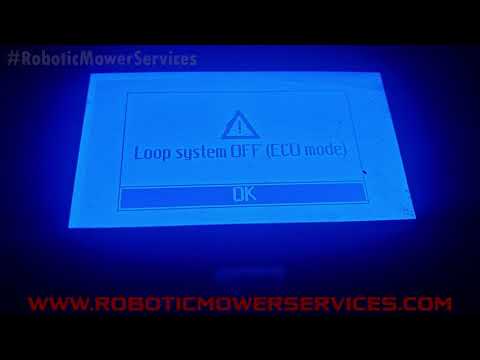
If you’ve ever seen messages like:
- “No loop signal”
- “Out of boundary”
- “Loop error”
…that’s your biggest clue. These errors almost always point to one thing: the mower can’t detect a clean boundary wire signal.
Here’s the reality—based on manufacturer documentation and service data, wiring issues are consistently the #1 reason robot mowers fail to return home. In fact, high resistance in the boundary loop (often above typical thresholds) is a known indicator of hidden breaks or corroded connections that weaken the signal.
And here’s why that matters. Your mower doesn’t “see” your lawn. It follows an invisible signal running through that wire. If that signal is weak, broken, or inconsistent:
- It may stop mid-lawn
- It may wander endlessly
- Or it may never find its way back to base
Common culprits include:
- A cut wire (from edging, pets, or garden tools)
- Old or poorly sealed connectors letting in moisture
- Sharp bends or incorrect routing near the base
A quick visual inspection helps, but don’t stop there. Check the base station LED—most systems clearly indicate whether the loop is intact or faulty.
2.3 Step 3 – Identify Behavior: Wandering, Stopping, or Missing the Dock
No error messages? That’s where things get interesting. At this point, your mower is trying to return—it’s just failing in a specific way. And that behavior tells you exactly what’s wrong.
Let’s break it down:
Wandering endlessly without finding the base
This usually means the mower can’t “lock onto” a clear return path. Think poor guide wire layout, weak signal zones, or complex lawn geometry. It’s like trying to find your car in a parking lot with no landmarks.
Stopping mid-lawn with battery left
Often tied to signal dropouts or terrain issues. If there’s a section of your yard where the mower consistently gives up, chances are the signal is weak there—or it’s physically struggling (slopes, soft ground, obstacles).
Reaches the base… but fails to dock
This one drives people crazy. The mower is right there—and still can’t finish the job. In most cases, this comes down to:
- Misaligned base station
- Uneven or sloped ground
- Wire not running straight under the base
- Loose installation (yes, even slight shifts matter)
As some installation guides point out, even a few centimeters of misalignment can prevent proper docking. It doesn’t just clean. It needs to line up perfectly.
2.4 Quick Docking Test to Confirm the Problem
Here’s the fastest way to cut through all the guesswork: the 3-meter docking test.
Now watch closely. This simple test is powerful because it isolates the problem:
- If it fails here, the issue is likely base placement, alignment, or immediate surroundings
- If it succeeds consistently, your base setup is fine—and the issue lies somewhere out in the lawn (layout, signal coverage, terrain)
According to manufacturer guidance, repeating this test multiple times helps confirm whether the behavior is consistent or random. That consistency is your clue.
What should you look for?
- Does it follow the wire smoothly?
- Does it approach in a straight line?
- Does it align cleanly with the charging contacts?
Or does it hesitate, drift, bump, and back away? That last scenario is the classic sign of a setup issue near the dock—often something as simple as uneven ground, a curved wire entry, or a base that’s slightly off-center.
3. Most Common Causes (and Fixes) When a Robot Mower Won’t Return to Base
3.1 Boundary Wire & Guide Wire Problems (The #1 Culprit)
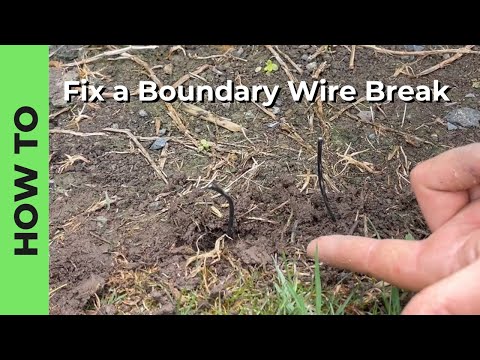
If there’s one issue that comes up again and again, it’s this: the wire system fails.
Your robot mower depends on a continuous, low-voltage signal running through the boundary and (if equipped) guide wire. Break that signal—even slightly—and the mower loses its way home.
Complete Wire Break
- Easy to spot with error messages
- Base station LED usually changes color/flashes
Partial Damage (The Saboteur)
- Corroded connectors or poorly sealed splices
- Nicked cables that weaken signal strength
- Inconsistent docking behavior
Industry guidance consistently points to wiring as the primary failure point in docking issues—and for good reason.
What to check:
- Walk the entire boundary loop (yes, the whole thing)
- Pay special attention to recent landscaping areas
- Inspect every splice or repair point
- Look for moisture damage or loose connectors
And if you’ve used tape or DIY fixes underground? That’s often the weak link. Proper gel-filled connectors are designed to keep moisture out long-term.
3.2 Base Station Placement Mistakes That Confuse Docking
Let’s say your wires are perfect—but your mower still can’t dock cleanly. This is where base station placement becomes the silent saboteur.
- The base is too close to a corner
- The boundary wire curves as it enters the station
- The ground isn’t level
- The base shifts over time
Here’s the thing most people don’t realize: your mower isn’t “seeing” the dock like a human would. It’s following a signal and expecting a clean, straight approach path. If the wire curves or the base sits at an angle, the mower approaches slightly off-center… and misses the contacts.
Fixes that actually work:
- Reposition the base on flat, firm ground
- Ensure the wire runs straight under the station
- Keep at least a short, clear “runway” in front
- Secure the base tightly so it doesn’t move
3.3 Terrain, Obstacles, and Slopes That Block the Return Path
Sometimes, the problem isn’t signal or setup—it’s your yard itself. Your mower might know exactly where the base is… but physically can’t get there.
Common terrain-related culprits:
- Slopes near the base
- Loose soil, sand, or gravel
- Narrow corridors between zones
- Overgrown edges or obstacles blocking the wire path
According to manufacturer recommendations, the area around the base should be flat and free of elevation changes. Even small dips or bumps can disrupt the final approach.
One particularly useful trick? Run a short docking test and physically follow the mower. You’ll often see the exact moment it struggles—whether it’s slipping, bumping into something, or losing alignment.
Simple fixes:
- Flatten and compact the area in front of the base
- Add pavers or a firm surface if needed
- Widen narrow passages or adjust wire layout
- Remove obstacles along the return path
3.4 Dirty Wheels, Misaligned Contacts, and Mechanical Issues
Your mower reaches the base perfectly… And then just sits there. Not charging. Or worse—backs out and tries again. At this point, the issue isn’t navigation. It’s mechanical.
Over time, dirt, grass clippings, and moisture build up on:
- Wheels
- Front casters
- Charging contacts
That buildup can cause small but critical problems: wheels lose traction during final alignment, or the mower sits slightly off-angle. If the contacts don’t connect properly, the system fails.
What to check and clean:
- Charging contacts (both on mower and base)
- Wheel treads and front casters
- Any debris stuck underneath
4. Advanced Troubleshooting: Signal, Software, and Hardware Issues
4.1 Weak Signal, Long Loops, and Coverage Dead Zones
Here’s where things get sneaky.
Your mower mostly works… until it reaches that one corner of your yard where it suddenly forgets how to get home. Sound familiar?
This is often a signal strength problem, not a wiring break.
Industry diagnostics show that when the mower drifts too far from the boundary—especially in wide open areas—it can lose its reference entirely and stop or wander.
One key insight from technical service data: if the mower is too far from any boundary wire, it may fail to detect the signal reliably. That’s when you see random “lost” behavior.
You might notice:
- It always fails in the same distant zone
- It spins or pauses as if “confused”
- It never even starts heading home
Fixing this isn’t about replacing parts—it’s about bringing the signal closer:
- Add a guide wire through the center of the lawn
- Reduce unnecessary loop length
- Avoid overly complex routing
Think of it like Wi-Fi dead zones. The mower isn’t broken—it just can’t “hear” the signal clearly enough to act.
4.2 Guide Wire Misconfiguration and Navigation Settings
Now let’s talk about something most people overlook: your mower’s navigation logic.
Because even with perfect wiring and placement, bad settings can send your mower on a wild goose chase.
Modern robot mowers rely on software behaviors like:
- “Near wire follow” (how closely it tracks the boundary)
- Zone or sub-zone definitions
- App-based “channels” or virtual paths
If these are misconfigured, the mower might:
- Follow the wrong path back
- Overshoot the base
- Get stuck looping in a sub-zone
- Ignore the most efficient route entirely
You’ll see behavior like:
- Passing right by the base without docking
- Getting trapped in a side area
- Taking absurdly long routes home
Fixes here are surprisingly simple:
- Reset navigation settings to default
- Reduce or disable “near wire follow” in tricky zones
- Recreate channels or guide paths in the app
4.3 Communication Errors (Bluetooth, App, or Firmware)
Let’s say everything looks perfect physically—but your mower still behaves unpredictably.
This is where communication issues come into play.
Some mowers rely on Bluetooth or app-based communication with the base station for:
- Dock recognition
- Zone switching
- Navigation updates
If that connection breaks or glitches, the mower might:
- Pass near the base without recognizing it
- Fail to execute “Go Home” commands
- Use outdated or incorrect navigation logic
You’ll especially notice this if:
- The problem started after moving the base
- You recently changed phones, Wi-Fi, or settings
- The mower behaves differently in app-controlled vs automatic modes
In some documented cases, even when the mower physically reaches the base area, it fails to dock because it doesn’t “see” the base digitally.
What helps:
- Re-pair the mower with the app/base
- Check that Bluetooth or connectivity is enabled
- Reset or update firmware
- Reconfigure zones or channels after relocating the base
4.4 When It’s Actually a Hardware Failure
Alright—let’s be honest.
Sometimes, it’s not the setup. It’s not the wire. It’s not the terrain. It’s the hardware.
But here’s the key: this is much less common than people assume.
After you’ve ruled out everything else, real hardware issues may include:
- Faulty base station electronics (PCB)
- Damaged antenna plate affecting docking signal
- Power supply delivering unstable voltage
- Internal receiver failure inside the mower
| Symptom | Potential Hardware Culprit |
|---|---|
| Base LED error with good wiring | Base Station PCB / Electronics |
| No signal detection on wire | Internal Receiver Failure |
| Consistent docking miss/alignment | Antenna Plate / Charging Pins |
| Unstable power / Random shutdowns | Power Supply Unit (PSU) |
At this stage, DIY fixes hit a wall. That’s when it’s time to:
- Contact manufacturer support
- Replace the power supply or base unit
- Schedule professional service
5. How to Prevent Docking Problems in the Future

5.1 Install the Base Station Like a Pro (Flat, Straight, Stable)
Let’s be real—most docking problems don’t start with failure. They start with installation shortcuts.
The Correct Approach
- Place the base on truly level ground
- Ensure a straight wire path into/out of station
- Secure base firmly to prevent shifting
Avoid These Shortcuts
- “Close enough” leveling
- Sharp wire turns right at the entrance
- Placing in soft, sinking soil
Because your mower relies on repeatable geometry. It expects the same approach angle every single time. Even slight shifts—caused by soft soil or repeated bumps—can throw off that precision.
5.2 Design a Reliable Wire Layout from Day One
If the base is the “garage,” the wire layout is the road system leading to it. And a poorly designed road? That’s how your mower gets lost.
A clean layout should feel almost boring:
- Straight, symmetrical approach near the dock
- Smooth curves instead of sharp angles
- Logical routing that avoids unnecessary detours
Also, don’t cut corners (literally) with connections. Use proper waterproof connectors. Moisture and corrosion are slow killers that cause intermittent failures later.
5.3 Prepare Your Lawn for Autonomous Navigation
Common trouble spots that disrupt the return path:
- Small dips or holes near the base
- Narrow passages between zones
- Loose soil, sand, or gravel
- Overgrown edges creeping into the wire path
Manufacturers consistently recommend a flat, obstacle-free approach zone near the dock—and for good reason.
Simple upgrades make a huge difference:
- Add pavers or compact soil near the base
- Widen tight passages
- Trim edges regularly
- Remove or reposition obstacles
A robot mower doesn’t adapt like a human. It depends on consistency. Give it a clean path—and it becomes unstoppable.
5.4 Simple Maintenance Habits That Prevent 90% of Issues
But if you want a truly hands-off lawn, a 5-minute routine can save you hours of frustration.
- Wipe charging contacts regularly
- Brush off wheels and remove packed grass
- Check that the base is still firmly secured
- Inspect visible wire sections for damage
- Confirm settings haven’t changed after updates
Also, after heavy rain or yard work, do a quick visual scan. Many “random” failures happen right after environmental changes.
6. Conclusion
A robot mower that won’t return to base feels like a major failure—but in reality, it’s usually something simple hiding in plain sight.
In most cases, the root cause comes down to three things: signal issues, base placement, or environment. Not broken hardware.
The key is to stop guessing and follow a logical process. Start with charging and signals, observe behavior, test docking, and work your way outward. Once you identify the pattern, the fix becomes obvious—and often surprisingly quick.
Just a consistently clean lawn—on autopilot.
FAQ
Q: Why does my robot mower reach the base but fail to dock?
A: This is usually caused by an unlevel base station, misaligned charging contacts, or the boundary wire not running straight under the dock. Even a slight shift in the base unit can prevent the mower from aligning correctly with the charging pins during its final approach.
Q: How do I know if my boundary wire is broken?
A: Most base stations feature an LED indicator that flashes or changes color when a loop is broken. Additionally, the mower will typically display a "No Loop Signal" or "Out of Boundary" error message if it cannot detect the low-voltage signal from the wire.
Q: Can dirty charging contacts prevent docking?
A: Yes. Oxidation, grass residue, or dirt on the metal contacts can increase resistance or block the electrical connection entirely. If the mower fails to recognize it has docked, it may back out and attempt the process again, eventually depleting its battery in the process.
Q: Does the ground in front of the base station need to be flat?
A: Absolutely. Manufacturers recommend a flat, firm approach zone. Slopes, dips, or soft soil can cause the mower to lose traction or tilt, leading to docking misalignment. Compacting the soil or adding pavers can provide the necessary stability for consistent docking.
Q: What is the 3-meter docking test?
A: It is a diagnostic test where you place the mower three meters directly in front of the base and command it to dock. Success indicates the base setup is correct; failure suggests the issue lies with the base placement, alignment, or the immediate wire entry path.