
Battery Degradation in Robot Vacuums: Expected Lifespan & Replacement Guide
Aaron Cooper1. Introduction
If your robot vacuum doesn’t feel as “tireless” as it used to, you’re not imagining things. That once full-home clean now stops halfway. It heads back to the dock more often. Maybe it even gives up mid-room.
In this guide, we’ll break down how long robot vacuum batteries really last, why they wear out, how that impacts cleaning performance, and most importantly, when to replace them (and how to make them last longer in the first place).
2. How Long Do Robot Vacuum Batteries Last?

2.1 Typical Lifespan: Years vs Charge Cycles
Let’s start with the number everyone wants: how long should a robot vacuum battery last?
Across major manufacturers and industry data, the answer is surprisingly consistent. Most lithium-ion batteries last about 2–5 years or roughly 300–500 full charge cycles before performance noticeably drops. That’s not a flaw—it’s just how rechargeable batteries work.
This is why two identical robots can age completely differently. One feels “worn out” after 18 months. The other still cruises along years later. And once you cross that cycle threshold, it’s not a sudden death. It’s a slow fade. Less runtime. More charging. More interruptions. Eventually, it stops being convenient—which defeats the whole point of owning a robot vacuum in the first place.
2.2 Runtime When New vs After Degradation
Think back to when your robot was new. You’d press “clean,” walk away, and come back to spotless floors. No babysitting. No second runs.
Most robot vacuums deliver somewhere between 60 to 180+ minutes of runtime per charge, depending on settings, floor type, and model.
Now fast forward a couple of years. As the battery degrades to about 80% of its original capacity, something subtle but frustrating happens: your cleaning sessions shrink. That same robot that once handled your entire home in one go now taps out early.
And it’s rarely a clean cut. Instead:
- It cleans half the house… then quits
- It docks mid-job… sometimes multiple times
- Total cleaning time quietly doubles
Sure, modern robots try to compensate with recharge-and-resume. But let’s be honest—that seamless “set it and forget it” experience? It starts to crack. It doesn’t just clean. It interrupts.
2.3 How Battery Life Fits Into Overall Robot Lifespan
Here’s the bigger picture most people miss: your robot vacuum will likely outlive its battery.
Most robots are built to last around 4–6 years with proper maintenance. Meanwhile, the battery typically needs replacing somewhere in the middle of that journey.
Think of it like tires on a car. You don’t replace the car—you replace the part that wears down. So if your robot suddenly feels “old,” there’s a good chance the battery—not the machine—is the real culprit. Swap in a fresh battery, and many robots feel surprisingly close to new again. Same navigation. Same suction. Just… endurance restored.
3. Why Robot Vacuum Batteries Degrade Over Time

3.1 The Science Behind Lithium-Ion Battery Aging
At a glance, battery degradation feels random. Inside the battery, every cleaning cycle leaves a tiny scar. Lithium-ion batteries age in two main ways:
- Cycle aging: Every time your robot charges and discharges, a small amount of capacity is permanently lost.
- Calendar aging: Even if you barely use your robot, the battery still ages over time due to ongoing chemical reactions.
Over time, these effects stack up. The battery doesn’t just “store less energy”—it also develops higher internal resistance. That means it struggles to deliver power efficiently, especially during demanding tasks like carpet cleaning.
3.2 Common Habits That Accelerate Battery Wear
Most battery damage doesn’t come from defects—it comes from everyday habits. Some of the biggest lifespan killers:
Battery Lifespan Killers
- Running the battery to 0% repeatedly: Deep discharges stress lithium cells and cause irreversible damage.
- Heat exposure: Charging in hot environments speeds up chemical aging dramatically.
- Constant max power mode: High power draws more current and generates more heat.
- Leaving it unused at 0% or 100%: Both extremes contribute to faster degradation.
- Using non-standard chargers: Can disrupt proper charging control and increase stress.
3.3 How Maintenance and Home Environment Affect Battery Health
This is the hidden factor most people overlook: your battery doesn’t just power the robot—it reacts to how hard the robot has to work.
Imagine this scenario: Hair tangled in the brush. Filters clogged. Dustbin overflowing. Thick carpets everywhere. Now your robot isn’t gliding—it’s fighting. This leads to:
- Higher energy consumption per minute
- More heat buildup
- Deeper discharge cycles
Even your home layout plays a role. Cluttered spaces force more stops, turns, and recalculations—burning more energy than a clean, open floor plan. The takeaway? A poorly maintained robot doesn’t just clean worse. It ages faster.
4. How Battery Degradation Affects Cleaning Performance

4.1 Shorter Runtime and Incomplete Cleaning Cycles
At first, battery degradation feels subtle. Then one day, your robot just… stops halfway through the house.
What’s happening is simple: the battery can’t hold as much energy as it used to. Once capacity drops, runtime shrinks—and that directly limits how much floor your robot can cover in a single session.
In real life, that means:
- Rooms get cleaned inconsistently
- Larger homes are left half-finished
- You start noticing “missed zones” more often
This is where frustration kicks in. You didn’t buy a robot vacuum to manage it mid-clean. You bought it to forget about it.
But with a degraded battery, that “set it and forget it” promise starts to fall apart—one incomplete cleaning cycle at a time.
4.2 Longer Cleaning Times with Recharge-and-Resume
Modern robot vacuums are smart enough to compensate. When the battery runs low, they return to the dock, recharge, and resume cleaning where they left off.
Sounds great on paper, right?
Instead of one seamless run, your robot now:
- Cleans part of the house
- Stops to recharge
- Waits (sometimes hours)
- Resumes later
Yes, the job eventually gets done. But the experience changes completely. Cleaning becomes fragmented. Noisy. Drawn out.
If you’ve ever had your robot resume cleaning late at night—or right when you’re on a call—you know exactly how disruptive this can feel.
Recharge-and-resume is a clever workaround. But it’s not a true fix. It’s a sign your battery no longer has the endurance it once did.
4.3 Real-World Signs Users Notice First
Most people don’t track battery cycles or capacity percentages. They notice symptoms—and those symptoms often get misinterpreted.
You might think:
- “Is the suction getting weaker?”
- “Why is it missing spots?”
- “Did the navigation get worse?”
But in many cases, the root cause is simply battery degradation. Here’s what typically shows up first:
- Frequent returns to the dock: The robot heads back far more often than it used to—even in the same layout.
- Sudden shutdowns mid-clean: It stops unexpectedly, sometimes with battery still “remaining.”
- Sharp drops in battery percentage: It goes from 40% to empty faster than expected—a classic aging sign.
- Incomplete cleaning coverage: Areas that used to be cleaned reliably are now skipped or left unfinished.
Under the hood, this comes down to increased internal resistance and reduced capacity. The robot simply can’t deliver stable power anymore—especially under load (like carpets or max suction).
So before blaming navigation or suction… check the battery. It’s often the real culprit.
5. When and How to Replace Your Robot Vacuum Battery
5.1 Clear Warning Signs You Need a Replacement
There’s a moment every robot vacuum owner hits: the cleaning experience becomes more annoying than helpful. That’s your signal.
The Red Flags of Battery Failure
- Runtime drops sharply: Your robot runs for half the time it used to.
- Charging takes longer: Aging batteries develop higher internal resistance.
- Unexpected shutdowns: It dies mid-clean without warning.
- Fails to return to the dock: It runs out of power before making it home.
- Refusal to start: The robot won’t hold a charge at all.
If you’re seeing more than one of these at once, it’s not a coincidence—it’s a worn-out battery. And here’s the key mindset shift: this isn’t a failure. It’s normal wear. Batteries are consumables, just like filters or brushes.
5.2 Battery Replacement Frequency and Expectations
So how often should you expect to replace the battery? Most households fall into a predictable pattern:
- Daily cleaning (large homes, pets): about 1–2 years
- Moderate use (3–4 times/week): around 2–3 years
- Light use: up to 3–5 years
These timelines align closely with the typical 300–500 charge cycle lifespan of lithium-ion packs. Since robot vacuums themselves often last 4–6 years, battery replacement is almost guaranteed at least once during ownership.
5.3 DIY vs Professional Replacement: What to Know
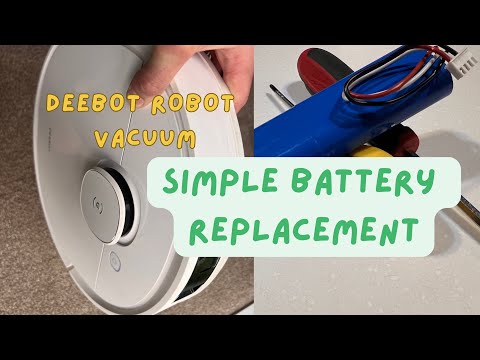
Here’s the good news: in many cases, replacing a robot vacuum battery is surprisingly simple. Most consumer models are designed with a bottom panel secured by screws and a plug-in battery pack.
- Flip the robot over
- Remove the bottom cover
- Disconnect the old battery
- Plug in the new one
- Reassemble and fully charge
5.4 Is It Worth Replacing the Battery or Upgrading the Robot?
This is the real decision point. Do you fix… or move on?
| Scenario | Best Choice |
|---|---|
| Robot is under 3 years old, works well aside from battery | Replace battery |
| Robot is 3–5 years old, still reliable overall | Usually replace battery once |
| Robot is 5+ years old with multiple issues | Upgrade |
| Battery hard to find or service-only replacement | Consider upgrading |
Pros of Upgrading
- Smarter navigation & obstacle avoidance
- Auto-empty dock compatibility
- More efficient battery management
Cons of Upgrading
- Higher upfront cost
- Learning a new app/interface
- Waste (if old robot is still repairable)
6. Conclusion
Battery degradation isn’t a defect—it’s the natural cost of convenience. Most robot vacuum batteries last 2–5 years, gradually losing capacity until shorter runtimes and interrupted cleaning become impossible to ignore. The good news? This decline is predictable—and fixable.
For most users, replacing the battery once during a robot’s 4–6 year lifespan is completely normal and often the most cost-effective way to restore performance. And if you build better habits—avoiding deep discharges, keeping your robot clean, and storing it properly—you can stretch that lifespan even further.
At the end of the day, a fresh battery doesn’t just extend your robot’s life. It brings back the one thing you bought it for: effortless, hands-free cleaning.
FAQ
Q: How long does a typical robot vacuum battery last?
A: Most lithium-ion batteries in robot vacuums last between 2 to 5 years, or approximately 300 to 500 full charge cycles. After this point, capacity typically drops below 80 percent, leading to noticeably shorter runtimes and more frequent docking during cleaning sessions.
Q: What are the signs that my battery needs replacing?
A: Common indicators include the robot failing to finish cleaning a room it previously handled easily, frequent mid-cycle returns to the dock, sudden shutdowns before the battery reaches zero, and significantly longer charging times due to increased internal resistance.
Q: Does using Max Power mode hurt the battery?
A: Yes, constant use of turbo or max suction modes generates more heat and draws higher current, which accelerates chemical aging. To preserve battery health, it is recommended to use standard power settings for hard floors and only use max power for deep carpet cleaning.
Q: Can I replace the robot vacuum battery myself?
A: Most consumer robot vacuums feature user-replaceable battery packs accessible via a bottom panel and a simple screwdriver. However, some premium or sealed models may require professional servicing, so always consult your manufacturer's manual to ensure user replacement is supported.
Q: Is it better to replace the battery or buy a new robot?
A: If the battery replacement cost is under 50 percent of a new unit and your robot is less than five years old, replacing the battery is highly cost-effective. If the robot is older and lacks modern features like auto-empty docks, upgrading may be the better investment.