
Eufy X10 Pro Omni Review: Analyzing the Budget Flagship Robot Vacuum
Aaron Cooper1. Introduction: Can a “Budget Flagship” Really Replace Premium Robot Vacuums?
Robot vacuums used to be simple helpers. Now? They’re trying to become full-on housekeepers. The problem is, the ones that truly replace your weekend cleaning routine usually cost well over $1,000. That’s where the Eufy X10 Pro Omni steps in—positioned around the $800 mark, it promises flagship features like a self-emptying dock, dual spinning mops, and AI-powered navigation without the flagship price tag.
Sounds almost too good, right?
2. Cleaning Performance Breakdown: Does It Really Clean Like a Flagship?

2.1 Hard Floors & Everyday Debris: Where It Truly Shines
Let’s start with the reality most homes live in: crumbs in the kitchen, dust along baseboards, and that never-ending trail of pet hair.
On hard floors, the Eufy X10 Pro Omni feels effortless. It doesn’t just sweep debris around—it actually picks it up cleanly in a single pass. The reason isn’t just raw suction numbers. In fact, independent testing shows airflow performance sits in the “average” range for its class, yet the real-world results tell a different story.
You feel it immediately. Walk barefoot across tile or hardwood, and there’s no grit. No residue. Just clean.
This is where the “budget flagship” label actually holds up. For everyday debris on hard floors, it doesn’t feel like a compromise at all.
2.2 Carpet Performance: Daily Cleaning vs Deep Extraction
Carpet is where things get more nuanced—and where expectations matter.
On low and medium-pile carpets, the X10 Pro Omni handles daily cleaning surprisingly well. Crumbs, surface dust, and even pet hair get lifted effectively. Your rugs will look clean after a run, and for most households, that’s exactly what you need day-to-day.
Think of it like this:
- For maintenance? It’s excellent.
- For deep, once-a-week “reset” cleaning? It’s good—but not elite.
If your home is mostly hard floors with a few rugs, you’ll barely notice this limitation. But if you’re dealing with wall-to-wall plush carpet, this is where the price gap starts to make sense.
2.3 Mopping System: Dual Spinning Pads That Rival Premium Models
Now this is where things get genuinely impressive.
Most robot vacuums “mop” by dragging a damp cloth across your floor—which often just spreads dirt around. The X10 Pro Omni does something very different.
Its dual spinning mop pads rotate at 180 RPM with about 1 kg of downward pressure, actively scrubbing the floor. That pressure matters. It’s the difference between wiping and actually cleaning.
Pros
- Active scrubbing removes dried coffee and muddy prints
- Automatic 12 mm mop lift protects carpets
- Dock washes and dries pads to prevent smells
Cons
- Heavily encrusted stains may still need manual attention
It’s not just good for the price. It’s genuinely competitive with premium systems.
2.4 Pet Hair & Edge Cleaning: Real-Life Performance in Busy Homes
If you’ve ever spent a Sunday untangling hair from a brush roll, you already know the pain.
The X10 Pro Omni tackles this with an auto-detangling brush system. Instead of letting hair wrap endlessly, it actively clears it during operation. In practice, this means far fewer “maintenance sessions” with scissors in hand.
For pet owners, this is a big deal:
- On hard floors: hair pickup is excellent, often near-complete in a single pass.
- On carpets: strong performance for surface hair, though thicker carpets may still hold onto deeper strands.
Edge cleaning is solid—but not perfect. Like most round robots, it can leave a faint line of debris in tight corners. The side brush helps, but physics still wins in sharp 90-degree angles.
If your home has pets, the X10 Pro Omni dramatically reduces daily cleaning effort. Not flawless. But close enough that you stop thinking about it.
3. Smart Navigation & Obstacle Avoidance: How “Intelligent” Is It?
3.1 LiDAR Mapping + AI Camera: Fast, Accurate, and Mostly Reliable
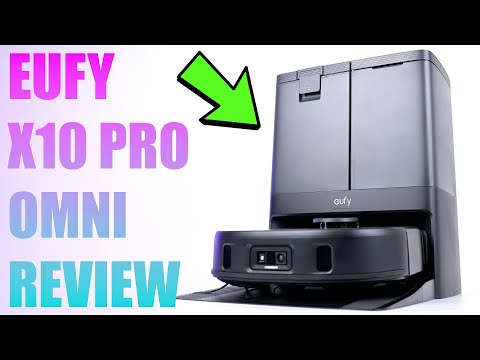
Before a robot can clean well, it has to know where it’s going. And this is where the X10 Pro Omni feels far removed from older, random-navigation bots.
It uses LiDAR (laser-based mapping)—think of it like a spinning sensor that scans your home in 360°, building a precise floor plan in minutes. Pair that with SLAM (Simultaneous Localization and Mapping) and you get structured, methodical cleaning paths.
- Mapping: Scans the environment to create an accurate digital floor plan.
- Pathing: Executes clean, straight-line patterns for maximum efficiency.
- Control: Allows for room-level specific instructions (e.g., "clean the kitchen").
3.2 Obstacle Avoidance in the Real World: Cables, Toys, and Pet Messes
The X10 Pro Omni uses a front-facing AI camera system (often referred to as “AI.See”) to recognize objects. Instead of bumping into everything, it sees and navigates around them.
| Object Type | Performance |
|---|---|
| Cables & Wires | Avoids most of the time |
| Shoes & Toys | Highly reliable navigation |
| Pet Waste | Identifies and avoids in typical conditions |
But it’s not perfect. Very small or flat objects can still get nudged, and low-light conditions can reduce accuracy. Still, compared to older robots that blindly bulldoze through everything, this feels like a massive upgrade.
3.3 Where It Falls Behind Ultra-Premium Navigation Systems
Here’s the honest part: it’s smart—but not the smartest.
Compared to ultra-premium systems from brands like Roborock or Dreame, the X10 Pro Omni is just a step behind in refinement. Top-tier robots recognize a wider range of objects more consistently and navigate complex, cluttered spaces with fewer hesitations.
The key difference? Polish. The X10 Pro Omni gets the job done—and does it well. But the absolute top-tier robots feel just a bit more effortless. That’s really the theme of this entire machine.
4. Automation & Daily Maintenance: Is It Truly Hands-Free?

4.1 All-in-One Dock Explained: Self-Empty, Mop Washing, and Drying
This is where robot vacuums either change your life—or become another gadget you forget to use.
The Eufy X10 Pro Omni leans hard into the “set it and forget it” promise. Its all-in-one dock doesn’t just charge the robot—it handles almost every dirty task you’d normally dread.
After a cleaning run, the robot returns and automatically empties its dustbin into a sealed bag. No more tapping dust out over a trash can while it puffs back into your face. Then it washes the mop pads, scrubbing away grime, and follows up with hot-air drying to prevent that sour, damp-mop smell.
And here’s the real magic: water management. The dock refills the robot’s onboard tank automatically, so it can keep mopping without you intervening mid-cycle.
In daily life, this means you stop thinking about cleaning as a task. Floors just… stay clean.
4.2 What You Still Have to Do: Real Maintenance Expectations
Now, let’s be honest—“hands-free” doesn’t mean “zero effort forever.”
You will still have to interact with the system. Just not nearly as often.
Then there’s the usual upkeep:
- Replace dust bags every few weeks to months
- Clean or swap filters periodically
- Check the brush for any stubborn hair buildup (though the auto-detangling system reduces this a lot)
- Rinse the dock’s wash tray occasionally
The key difference? None of this is daily.
Instead of constant small annoyances—emptying bins, rinsing mop pads—you batch everything into quick, occasional maintenance sessions. Five minutes here, once a week or so.
That’s the trade-off. Not zero work. But dramatically less.
4.3 Noise, Dock Size, and Everyday Usability Trade-Offs
Here’s the part most people don’t think about until it’s sitting in their home.
And then there’s the noise.
The robot itself is fairly quiet during normal cleaning. You can run it while working or watching TV without much annoyance. But the dock? Different story.
- Auto-emptying sounds like a short, powerful vacuum burst
- Mop washing and drying cycles are clearly audible
It’s not constant—but when it happens, you’ll notice.
The good news is you can schedule cleaning (and therefore docking activity) when you’re out of the house. Do that, and the noise becomes irrelevant.
So yes, there are trade-offs: size, sound, visibility. But in exchange, you get something close to fully automated floor care.
And for most people? That’s a trade worth making.
5. Value for Money: Is the Eufy X10 Pro Omni Worth It in 2026?
5.1 What You Get for the Price: 80–90% of Flagship Experience?
Let’s address the big question: is this actually a “budget flagship,” or just clever marketing?
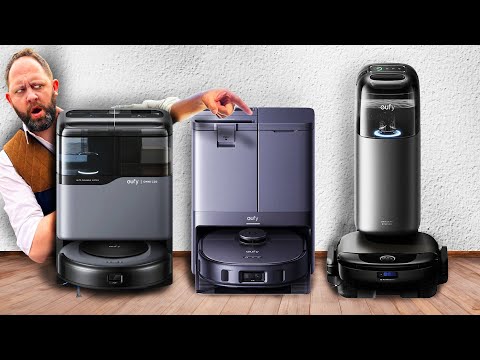
At roughly half the price of many premium robots, the Eufy X10 Pro Omni delivers something surprisingly close to the full experience. You’re getting vacuuming, dual spinning mops, AI obstacle avoidance, LiDAR navigation, and a fully automated dock—all features typically reserved for $1,000+ machines.
And in some areas, it genuinely competes head-to-head.
Mopping, for example, is a standout. The combination of spinning pads and real downward pressure means it doesn’t just wipe—it scrubs. Automation is another win. The dock handles dust, water, and mop care in a way that feels nearly identical to high-end systems.
Even obstacle avoidance holds up well, with performance often described as “one of the best for its price tier” in independent testing.
So yes—this really does feel like getting 80–90% of the flagship experience.
The missing 10–20%? That’s where things get interesting.
5.2 Key Trade-Offs vs Premium Robots (Roborock, Dreame, Ecovacs)
You’re saving hundreds of dollars. So where does that gap show up?
Let’s break it down clearly:
| Category | Eufy X10 Pro Omni | Ultra-Premium Flagships |
|---|---|---|
| Vacuum Power | Strong for daily cleaning | Better deep carpet extraction |
| Mopping | Excellent dual-pad system | Newer roller systems clean tougher stains |
| Navigation | Smart and reliable | More refined, fewer edge-case errors |
| App Experience | Functional and intuitive | More advanced customization and automation |
| Dock | Full automation (wash, dry, refill) | Similar, sometimes quieter or more polished |
The biggest real-world difference is carpet performance. If your home is full of thick rugs, premium robots with higher suction ceilings will pull out more embedded dirt.
Then there’s polish. Premium models feel smoother—fewer hesitations, smarter object recognition, more advanced app controls.
But here’s the key insight: none of these are dealbreakers for most homes.
They’re refinements, not fundamental gaps.
5.3 Who Should Buy It—and Who Should Skip It
So, is the Eufy X10 Pro Omni right for you?
Pros (Who Should Buy It)
- Your home has a mix of hard floors and rugs
- You want strong mopping without spending flagship money
- You value automation (self-empty, mop washing, drying)
- You have pets and want low-maintenance hair handling
Cons (Who Should Skip It)
- Your home is mostly thick carpet and you care about deep extraction
- You want the absolute best navigation and AI, no compromises
- You love highly customizable, power-user-level app controls
- You’re chasing the newest tech like roller mops or ultra-high suction systems
In those cases, paying extra for a top-tier model makes sense.
For everyone else?
This is the sweet spot. Less cost. Most of the experience. And a lot more free time.
Check Price on Amazon6. Conclusion: A Smart Shortcut to Flagship-Level Cleaning?
The Eufy X10 Pro Omni doesn’t completely replace ultra-premium robots—but it gets surprisingly close where it matters most.
In daily life, it delivers the things you actually feel: consistently clean hard floors, genuinely effective mopping, and a dock that takes over the chores you hate. You stop emptying bins. You stop washing mop pads. You stop thinking about cleaning altogether.
Where does it fall short? Mostly in the margins—deep carpet extraction, ultra-refined navigation, and next-gen features found in the most expensive models.
But here’s the reality: most homes won’t notice those gaps.
If your space is a mix of hard floors and rugs, and your goal is less effort—not perfection—the X10 Pro Omni hits a powerful balance.
It doesn’t just clean. It gives you your time back.
FAQ
Q: How does the Eufy X10 Pro Omni handle pet hair?
A: The vacuum features an auto-detangling brush system designed to clear hair as it cleans. Data indicates it is highly effective at reducing maintenance on hard floors, though very thick carpets may still require occasional manual brush cleaning.
Q: Does the mop lift when it encounters carpet?
A: Yes, the dual spinning mop pads automatically lift 12mm when the robot detects carpet. This prevents your rugs from getting damp while allowing the vacuum to transition seamlessly between different floor types in one cycle.
Q: Is the obstacle avoidance reliable?
A: The AI.See system uses a camera and LiDAR to recognize common objects like shoes and cables. While highly effective in well-lit conditions, analysis shows it may occasionaly struggle with very small objects or in low-light environments.
Q: Does the dock dry the mop pads?
A: The Omni station includes a hot-air drying function. After washing the pads, the dock circulates heated air to dry them, which significantly reduces the risk of mold and unpleasant odors compared to air-drying.
Q: How often do I need to empty the dirty water tank?
A: This depends on your cleaning frequency and home size, but most users find they need to refill the clean water and empty the dirty water every few days to maintain peak performance and hygiene.